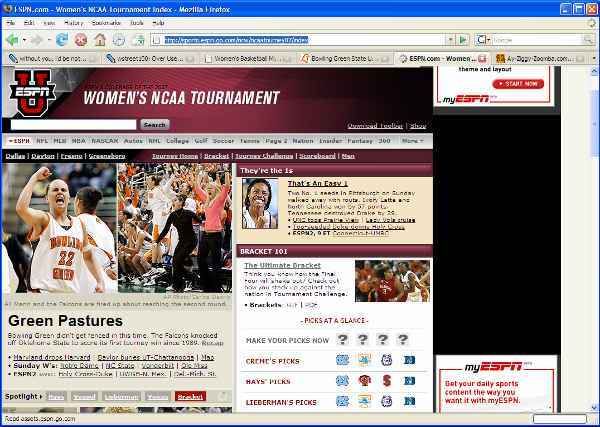
BG Stars of ESPN WBB Page Again!

BGSU Women's Basketball!!
Post Reply
User avatar
Peregrinner
Peregrine
Peregrine
Posts: 1937
Joined: Mon Jan 09, 2006 3:35 pm
Location: Okemos, MI / Bowling Green, OH
Contact:

BG Stars of ESPN WBB Page Again!

Post by Peregrinner »

- Terry S.
- Freddie Falcon 2007-2008
- Class of 2009

The 2nd Annual Alzheimer's Memorial Charity Golf Tournament
To benefit the Alzheimer's Association's Greater Michigan Chapter
July 16, 2011

http://alzheimersmemorial.org
User avatar
Falconfreak90
Rubber City Falcon
Rubber City Falcon
Posts: 18505
Joined: Fri Jul 23, 2004 9:28 am
Location: Green, OH
Contact:

Post by Falconfreak90 »

FLIPPIN SWEET. Tis a GREAT day to be a FALCON.

BEAT VANDERBILT!!!
Michael W.
BGSU-12 TIME MAC CHAMPION
FALCON FOOTBALL ROCKS!
User avatar
Jacobs4Heisman
a.k.a. Capt. Rex Kramer
Posts: 7889
Joined: Wed Nov 10, 2004 7:59 pm
Location: Aliquippa, PA

Post by Jacobs4Heisman »

Good thing you did a screen capture -- We've already been replaced. :cry:
Roll Along!
Strouse
Peregrine
Peregrine
Posts: 853
Joined: Sun Mar 20, 2005 12:21 am
Location: BGSU/Troy, Ohio

Post by Strouse »

Falconfreak90 wrote:FLIPPIN SWEET. Tis a GREAT day to be a FALCON.

BEAT VANDERBILT!!!
What are you talking about FF? It's ALWAYS great to be a FALCON!! :-D
~Roll Along You BG Warriors!~
Strouse
Peregrine
Peregrine
Posts: 853
Joined: Sun Mar 20, 2005 12:21 am
Location: BGSU/Troy, Ohio

Post by Strouse »

Jacobs4Heisman wrote:Good thing you did a screen capture -- We've already been replaced. :cry:
J4H, I just went there via the link posted, and BG's still on there.
~Roll Along You BG Warriors!~
User avatar
Jacobs4Heisman
a.k.a. Capt. Rex Kramer
Posts: 7889
Joined: Wed Nov 10, 2004 7:59 pm
Location: Aliquippa, PA

Post by Jacobs4Heisman »

Strouse wrote:
Jacobs4Heisman wrote:Good thing you did a screen capture -- We've already been replaced. :cry:
J4H, I just went there via the link posted, and BG's still on there.
HA -- good call. I was looking at the women's BB home page -- not the tourney home page.

We rule.
Roll Along!
User avatar
Peregrinner
Peregrine
Peregrine
Posts: 1937
Joined: Mon Jan 09, 2006 3:35 pm
Location: Okemos, MI / Bowling Green, OH
Contact:

Post by Peregrinner »

Jacobs4Heisman wrote:
Strouse wrote:
Jacobs4Heisman wrote:Good thing you did a screen capture -- We've already been replaced. :cry:
J4H, I just went there via the link posted, and BG's still on there.
HA -- good call. I was looking at the women's BB home page -- not the tourney home page.

We rule.
Yeah, I realized it wasn't the main WBB page right after I posted it, but got the screencap just in case anyway.

AY ZIG! GO FALCONS!
- Terry S.
- Freddie Falcon 2007-2008
- Class of 2009

The 2nd Annual Alzheimer's Memorial Charity Golf Tournament
To benefit the Alzheimer's Association's Greater Michigan Chapter
July 16, 2011

http://alzheimersmemorial.org
Falconboy
John Lovett's Successor
Posts: 5357
Joined: Sat Jul 24, 2004 1:40 pm
Location: Columbus
Contact:

Post by Falconboy »

Jacobs4Heisman wrote:Good thing you did a screen capture -- We've already been replaced. :cry:
Just a question, how do you do a screen capture?
Mid-2000's Anderson Animal
User avatar
jacojdm
Peregrine
Peregrine
Posts: 2275
Joined: Fri Jul 23, 2004 8:45 am
Location: cleveland
Contact:

Post by jacojdm »

falconboy wrote:
Jacobs4Heisman wrote:Good thing you did a screen capture -- We've already been replaced. :cry:
Just a question, how do you do a screen capture?
You just take a picture of your monitor, and upload it onto your favorite photo hosting site. It's that simple.
Image
User avatar
BGFan
Peregrine
Peregrine
Posts: 2891
Joined: Fri Jul 23, 2004 12:05 am
Location: Bowling Green, Ohio

Post by BGFan »

Of course, an easier way would be to press the Print Screen key, which loads it into your clipboard, at which point you can insert it anywhere your little heart desires (well, almost anywhere :wink: ).

Sorry, jacojdm, I'm just not quite as cruel as some are on here...
User avatar
Peregrinner
Peregrine
Peregrine
Posts: 1937
Joined: Mon Jan 09, 2006 3:35 pm
Location: Okemos, MI / Bowling Green, OH
Contact:

Post by Peregrinner »

BGFan wrote:Of course, an easier way would be to press the Print Screen key, which loads it into your clipboard, at which point you can insert it anywhere your little heart desires (well, almost anywhere :wink: ).
Yep, that's what I did. "Print Screen", then loaded up my graphic editing program and pasted it into a new file set to the dimensions of my screen, cropped it down to just the window, and there you have it.
- Terry S.
- Freddie Falcon 2007-2008
- Class of 2009

The 2nd Annual Alzheimer's Memorial Charity Golf Tournament
To benefit the Alzheimer's Association's Greater Michigan Chapter
July 16, 2011

http://alzheimersmemorial.org
User avatar
jacojdm
Peregrine
Peregrine
Posts: 2275
Joined: Fri Jul 23, 2004 8:45 am
Location: cleveland
Contact:

Post by jacojdm »

BGFan wrote:Of course, an easier way would be to press the Print Screen key, which loads it into your clipboard, at which point you can insert it anywhere your little heart desires (well, almost anywhere :wink: ).

Sorry, jacojdm, I'm just not quite as cruel as some are on here...
You guys spoil my fun. :)

I have a freeware program called MW Snap that I got from download.com. It lets me select a portion of the screen to capture if I don't want the whole thing. It's a nice program.
Image
User avatar
Jacobs4Heisman
a.k.a. Capt. Rex Kramer
Posts: 7889
Joined: Wed Nov 10, 2004 7:59 pm
Location: Aliquippa, PA

Post by Jacobs4Heisman »

I use gtpicthis -- same deal. Great for doing documentation of procedures.
Roll Along!
User avatar
BGFan
Peregrine
Peregrine
Posts: 2891
Joined: Fri Jul 23, 2004 12:05 am
Location: Bowling Green, Ohio

Post by BGFan »

jacojdm wrote:
BGFan wrote:Of course, an easier way would be to press the Print Screen key, which loads it into your clipboard, at which point you can insert it anywhere your little heart desires (well, almost anywhere :wink: ).

Sorry, jacojdm, I'm just not quite as cruel as some are on here...
You guys spoil my fun. :)

I have a freeware program called MW Snap that I got from download.com. It lets me select a portion of the screen to capture if I don't want the whole thing. It's a nice program.
SnagIt is also a great tool...I use it quite often at work and for 29.95 I've found it well worth the price. I can even put fancy arrows and stuff in the pic if I want to draw attention to something. Cool stuff...

Post Reply